
|
TV energy use in watts (2008-09 models) |
||||
| |
LED |
|
|
|
|
|
ing |
125 (98-156) |
125 (125) |
|
|
|
127 (91-236) |
176 (91-236) |
270 (188-464) |
|
|
|
ing |
260 (210-322) |
340 (191-474) |
170 (150-206) |
|
Google picks the ads, not me. I don't endorse the advertisers. |
||||
How much electricity does my television use?
Most TV's use about 80 to 400 watts, depending on the size and technology. Using a sample cost of 15¢ per kilowatt-hour and five hours of viewing a day, that's $1.83 to $9.13/mo. ($22 to $110 per year). Below you'll find energy usage information for different models.
Before you obsess over how much electricity your TV is using, I want you to obsess over how much your heating, cooling, and lighting is using. TV energy use is a drop on the bucket for most people. TV's typically account for only 5% of home electrical use.1 You can save more money by attacking the real energy hogs first.
The easiest way to save energy with your TV is to turn it off. Does anyone lie on their deathbed thinking, "I wish I'd watched more TV" ? I consider myself fortunate to have had a near-death experience, because it made me realize that I didn't want to waste the limited time I have on this planet on watching television. This isn't just my idea -- the feeling among the population that a television is a necessity is now at an all-time low. (Pew Research, 2009)
You may have heard that the newer TV's are energy hogs. That's true, but it's not because of the new technology, it's because new TV's are bigger than the old ones. LCD's are actually more efficient than the old CRT's they're replacing. But when you double or triple the screen size, that's gonna take more power.
If you're getting a new TV, here's my basic advice:
- Get an Energy Star model. The U.S. government gives the Energy Star label to energy-efficient appliances. Energy Star-labeled TV's use about 30% less energy than other models. Happily about 75% of current models are already Energy Star-compliant. Get an Energy Star TV and you can't go wrong. In fact, California is considering banning all non-Energy Star TV's. (MSNBC, 2009) See the list of Energy Star TV's.
- For <50" get a LCD, for >50" get a DLP. LCD is more efficient at small sizes, DLP at larger sizes. And if getting a DLP, get a model that uses an LED light source, which uses even less energy than older DLP models, and which will save you from having to replace the bulb every 1-3 years.
- Think twice about plasma. Plasma sets are the worst of all, in terms of energy use. However, if you don't watch TV very much, then the extra energy use of plasma won't be significant.
Here's a rundown of the different kinds of TV's.
 |
 |
 |
 |
 |
|
CRT. These are the big, bulky TV's and computer monitors from yesteryear. The tube is basically a big light bulb. They're not very energy efficient, but they use less energy than newer models because they tend to be smaller. A 19" TV uses about 80 watts, way less than just about any modern TV. |
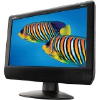
LCD (and LCD/LED). This is the same type of screen that goes in laptop computers and modern computer monitors. Much more efficient than CRT, they use about 125, 210, and 280 watts for the 32", 42", and 52" sizes respectively. They come in the widest range of sizes, from 5" to 65". Standard LCD's are lit with fluorescent lighting and don't have the best contrast (e.g., they don't show the deepest blacks). Newer models that are backlit with LED's and which have the "local dimming" feature have good contrast. If you're getting a new TV, LCD is a good choice for models up to 50" in size. (For bigger than that, go DLP.) |
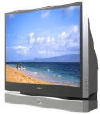
DLP. Also called "rear-projection", but there's no "projector" that you can see -- it's a regular enclosed TV like any other. Available only in larger sizes (50"+), and efficient at that size (~175 watts for a 56" model). If you're getting a huge 50"+ TV, go for DLP, and get one with an LED light source (otherwise you'll have to replace the bulb every 1-3 years). |
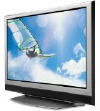
Plasma. Typical screen size 32"-60". Huge energy hogs. Plus, they generate lots of heat, which you'll be paying to remove with your AC. Not recommended (unless you watch such a small amount of TV that the extra energy usage isn't significant). |
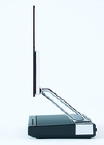
OLED. The most efficient of all, but as ofl 2010 they're not commercially available yet, and will likely be pricey compared to LCD for at least 2-3 years after it does become available. OLED's are also ridiculously, ridiculously thin. (more at an OLED website) |
Confusing TV terms explainedContrast. This is a measurement of picture quality, referring to the range between light and dark colors. A higher contrast ratio means a more vivid picture. All TV's have a pretty good contrast ratio except standard LCD's (not LCD/LED). DLP. One of the five kinds of TV's (along with CRT, LCD, Plasma, and OLED). Often called "projection" TV's, but the projector is internal so you can't see it. Available only in larger sizes (50"+), and energy-efficient at that size. Provides a better picture than standard LCD's while using less energy at the 50"+ sizes than plasma. CRT. One of the five kinds of TV's (along with LCD, Plasma, DLP, and OLED). These are the old, big, bulky TV's and computer monitors from yesteryear. They're not energy efficient, but they use less energy than newer models because they're so much smaller. Edge-Lit LED. An LCD+LED TV with the backlighting on the sides of the picture, rather than behind it. This allows the TV's to be ridiculously thin (like 1.2"). But Edge Lit models lack Local Dimming, so the contrast isn't quite as good as models with dimming. Energy Star. The U.S. EPA awards this label to products that are energy-efficient. Energy Star TV's use about 30% less energy than standard models. The easiest way to ensure that you're getting an energy-efficient TV is to make sure it has the Energy Star label. HDTV. This just refers to modern TV's which are wide rather than squarish. All new TV's are HDTV, whether they're LCD, DLP, or Plasma. You can't buy a non-HDTV these days. (Not new, anyway.) Local Dimming. A feature of some backlit LCD+LED models which turns off the backlight in parts of the screen when necessary, to produce deeper blacks. (Compare to Edge-Lit LED.) LCD. One of the five kinds of TV's (along with CRT, Plasma, DLP, and OLED). They're the most common, best value, and use the least amount of energy. LCD's use one of three types of lighting: (1) fluorescent ("CCFL"), (2) Edge-Lit LED, or (3) Backlit LED. Confusingly, some manufacturers (like Samsung) are deceptively calling #2 and #3 "LED TV's", but they're really LCD's TV's with LED backlighting. (True LED TV's like OLED aren't yet available in larger sizes.) The LCD/LED models have a better picture (better contrast, wider viewing angle) than the standard LCD models. LED. True LED TV's aren't really available yet in the consumer market, as I write this in Jan. 2010. What some manufacturers are dishonestly calling "LED TV's" are really LCD TV's that employ LED backlighting. True LED models, such as the OLED technology, aren't readily available. (e.g., Best Buy doesn't have any.) LED TV's are touted as being the wave of the future, but they're simply not available yet -- though companies like Samsung are trying to trick you into thinking otherwise. (BTW, Samsung also doesn't disclose how much energy their TV's use on their website. Double shame on them.) Plasma. One of the five kinds of TV's (along with CRT, LCD, DLP, and OLED). Produces the best picture (highest contrast, deepest blacks, wide viewing angle), but uses the most energy. |
By now you're probably familiar with HDTV, but if not, it refers to TV's that can display very high quality pictures, and have a wide rectangular display rather than an old squarish one. All modern TV's are now HDTV, whether the insides are LCD, DLP, or Plasma.
Make sure your TV isn't running in "store demo" mode, especially if you bought a floor model. The store demo mode is super-bright in order to do battle with the powerful ceiling lighting in electronics stores. But once you get home the extra brightness will likely just be annoying -- and energy-wasting, to the tune of an extra 5 to 27%.2 The setting you want is usually labeled something like "Movie", "Pro", or "Normal", and some plasma TV's even have an "Eco" setting (because plasma TV's are such energy hogs to begin with). The wasteful setting will say something like "Dynamic" or "Vivid. So if your TV is in the super-high brightness mode, you can save energy with it at the touch of a button.
Picture quality by TV type
| |
|
(edge LED) |
w/Local Dimming |
|
|
Good contrast (e.g., deep blacks) |
|
|
|
|
|
Wide viewing angle |
|
|
|
|
|
Typical thickness |
|
|
|
|
|
Toxic mercury |
|
|
|
|
|
Power consumption |
|
|
|
|
TV's of note
- Sony Bravia WE5 (42" LCD). This 2009 model not only uses way less energy in normal mode, it also senses when you leave the room and turns the picture off. Stay gone for 30 minutes and the whole thing powers down. Its standby mode barely sips any juice at all (0.17 watts), but if even that's too much for you can turn off standby with a special separate switch. This model was announced by Sony Europe, and I haven't been able to find out whether it will be available in the U.S. Unfortunately Americans don't demand energy-saving products as much as the Europeans do, which sometimes means that those products aren't sold here. (Sony Europe)
Standby power (vampire power) of
TV's
Standby power isn't the problem it used to be. Manufacturers have gotten wise and the overwhelming majority of TV's made after 2006 draw less than 1 watt of power when they're plugged in and not running. That's a mere 11¢/mo. at a sample electric rate of 15¢/kWh.
Standby power is more likely to be a problem with the TV accessories you have plugged in, like cable set-top boxes, and older devices like VCR's. I don't have cable TV so I can't easily measure a cable box, but once source says they use 45 watts of electricity (NRDC, PDF) and my understanding is that they're always "on", like cable modems. (I hope some readers will measure the wattage of their cable boxes and let me know how much energy they use, and whether you can turn these things off vs. them always being "on".)
An easy way to turn off lots of devices at once is
with a power strip. I've found power strips for as cheap as four
bucks at Home Depot, and deluxe models that have a separate switch for each outlet can be had for
$19. If you don't want to hassle with turning the switch off and
on, an electronic
timer can automatically turn your equipment off at night and on in
the morning.
Television energy calculator
You wanted it, you got it. My TV energy calculator will tell you exactly how much energy your TV uses, and how much you're paying for it. If your model isn't listed, just choose "Don't know/generic" for the brand and you'll get a pretty close estimate. I do have an assistant working on adding hundreds of models to the list, so your model might show up here eventually.
FakeTV deters burglars with far less energy than a real TV
Some people like to leave the TV on when they leave home, so burglars think there's someone in the house. Of course that wastes a lot of energy. But now there's an alternative: FakeTV, a little LED box that produces the same kind of light that a regular TV does (along with color and brightness changes), but using a heck of a lot less energy -- a measly three watts according to one retailer's page. (The manufacturer doesn't list the wattage on their page. I've got one of these on order so I can confirm the specs.) The price is right, too: only $25 from Amazon.
Footnotes & Sources:
(1) In 2004 TV's were 4% of home energy use, which was expected to grow to 6% by 2009. (NRDC, PDF) But since 2004 TV's have gotten more efficieint so I think 5% is a safer number. TV's were 2.9% of home energy in 2001. (Dept. of Energy) In 2008 TV's accounted for 1% of total U.S. electricity consumption. (Efficient Products)
(2) Store demo mode 5-27% higher than normal mode (EfficientProducts.org)
Sources for TV wattage information. CNET has a good list of over 100 TV's and how much power they draw. It's where I got much of the model data for this page. (Others I got from manufacturers, or by direct measurement.) More Energy Savings also has a list, but the site is very slow and usually crashes my browser.
TV market info. This 2006 EPA report has lots of info such as the marketshare of each type of TV (CRT, LCD, etc.) per year, the energy-share of those TV's, how much energy can be saved via Energy Star standards, etc.
Top manufacturcers. In 2008 the top manufacturers of U.S.-sold TV's were Samsung Electronics, Sony, Toshiba, Panasonic, and LG Electronics. (China View)