

Unplug chargers to save money?
Don't bother!
Late update: January 2016
You might have heard that unplugging
idle appliances around your home saves a lot of
electricity. But for the most part that's
just not true. Idle phone chargers and power adapters
likely account for way less than 1% of residential energy
use. (Those who claim it's 5-10% are looking at ancient
studies from long ago before new regulations kicked in, and even
then those old 5-10% figures were still suspect anyway.)
This means most people can't save much electricity by unplugging their wall chargers. You're much better off addressing your heating, cooling, lighting, laundry, and computer first. Have you done all that? Good. Now you can work on saving piddling 0.5% or so of household electrical use that comes from vampire power.
Modern regulations in many countries limit standby power to 1 watt or less, and California has limited external power supplies to a maximum of 0.5 watts since 2007. And since it's costly to develop and market different products for different regions, most manufacturers just made their worldwide products meet the California standards, no matter where their products are sold. California's laws thus reduced energy use on a far wider scale, just like they did with refrigerator energy use.
 There
are three kinds of things that use vampire power:
There
are three kinds of things that use vampire power:
- Devices in standby.
When you grab your TV's remote control and press ON, the TV
has to be getting a little juice already so it can receive
that ON signal and respond to it. It's "standing by"
waiting for you to turn it on with the remote. Other
things that use standby power because they're waiting to
respond to a button press are DVD players, stereos, and
microwave ovens. However, the amount of energy used for
standby in modern devices is tiny. TVs
made starting in 2006 use less than 1 watt in standby.
- Plug-in adapters. These
are
the big black blocks that convert AC to DC. Some of them
draw some current even when the device they're powering is
turned off (or in the case of chargers, even when the phone or
device is fully charged). If the adapter is warm even
when the device is off, it's wasting a little electricity, but
usually not much.
- Other devices that run off DC internally. In
some devices the AC-to-DC adapter is internal, to avoid having
the big, bulky plug-in adapter. This is really just like
#2 above except that you can't see the adapter.
- Devices that are always working,
even when you're not "using" them. Cable TV
boxes and DVRs are always running even if you're not
watching TV, and videogame consoles are always checking the
Internet for things like news and software updates.
The pre-2013 models sucked a lot of vampire power, but
modern ones use much less.
Most modern devices use no more than 1 watt in standby mode, and many of them use less than 0.5 watts. (WP) A one-watt device that runs continuously uses 8.8 kWh per year. But the typical American household uses 11,040 kWh per year. So the standby power for one device represents a mere 0.08% of the household's energy use. If the household has twelve of these devices, that still accounts for less than 1% of the entire household use. So now you'll see why chasing vampire power is usually a waste of time, unless you've already tackled your heating, cooling, laundry, lighting, and computer first.
 For
wall chargers it's often even less. Modern chargers
go down to zero (or pretty close to it) when nothing's plugged
into them. Even a charger using one watt when idle and
plugged in constantly would use only about $1 per year at
average electricity rates.
For
wall chargers it's often even less. Modern chargers
go down to zero (or pretty close to it) when nothing's plugged
into them. Even a charger using one watt when idle and
plugged in constantly would use only about $1 per year at
average electricity rates.
But what about older devices and adapters? Those
do use a bit more energy when idle, but the effect isn't that
great unless you have a lot of them. If a modern device
wasting 1 watt when idle costs about $1 a year to leave plugged
in constantly, then an older device wasting 10 watts when idle
costs only about $10 a year. Not the low-hanging fruit.
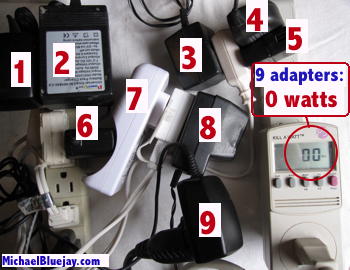
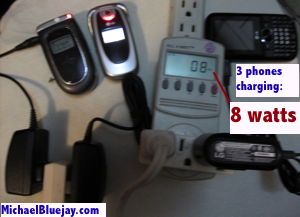
As a test, I plugged in nine wall chargers/adapters into a power strip and measured the consumption with a meter. As you can see from the picture above, the meter read "0"—all nine together didn't even use a single watt. I had to plug in a 10th adapter to get the screen to change from 0 to 1 watt.
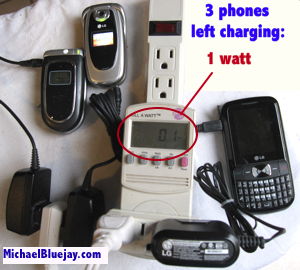
Oh, but maybe you've heard that the real penalty is leaving your phone connected to a charger after it's already finished charging? Hardly. I charged three phones and when they were finished charging, all three together used a mere 1 watt. (During charging, all three together used 8 watts. See pictures at right.) Two of those phones were 2004 models, by the way, hardly the latest and greatest.
One of my favorite environmental writers, David JC MacKay, put it this way:
"The
truth is that leaving the phone charger switched on uses
about 0.01 kWh per day. This means that switching the phone
charger
off for a whole day saves the same energy as is used in driving
an
average car for one second. Switching off phone chargers is like
bailing the Titanic with a teaspoon."
How do you know whether your particular devices are drawing
vampire power or not? Measure
it!
 Now,
there are some things that it pays to unplug, but
they're not phone chargers. You'll save by unplugging
(or putting on a switch):
Now,
there are some things that it pays to unplug, but
they're not phone chargers. You'll save by unplugging
(or putting on a switch):- Cable TV boxes & DVRs. If they're not an Energy
Star models and made before 2013, a cable TV box
+ DVR combo likely sucking around 50 watts of power, 24/7.
(NRDC, PDF)
That's
about as much as an Energy Star refrigerator, and
clocks in at around $72/year of electricity if the rate
is 16¢/kWh. Of course, with many of these models if you
unplug them you'll have to reprogram them when you reconnect
them, but dude, why are you watching cable TV anyway?
It's 2016! Mr. Electricity won't allow these devices in
his home. And in fact, ditching cable in favor of
Internet streaming saves the exorbitant cost of the cable
service itself, which dwarfs the cost of the electricity to
run it.
- Anything with a light that's always on (unless it's an LED light, which is okay).
- Water pumps. If you have a water pump it's probably for a reason, but at least put it on a timer so it doesn't run 24/7.
How to combat vampire power
- Address the low-hanging fruit first. You're much
better off addressing your heating,
cooling, lighting,
laundry, and computer
first. Have you done all that? Good.
Now you can work on saving piddling 0.5% or so of
household electrical use that comes from vampire power.
- Look for the Energy Star label when buying devices.
Energy
Star-approved products use little to no energy when idle.
- Test the devices you already own
to see if they're using too much standby power. If
they're not using much, then there's not much point in doing
the steps below to combat standby power. Ten devices
using 1 watt of standby cost only about $1/mo. to run, using a
sample rate of 15¢/kWh.
-
Unplug devices and adapters when you're not using them. This method is free but inconvenient. If you want convenience you can have it for a few bucks, as the next few items show...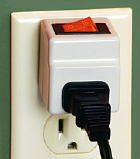
- For one or two items, get a flip switch. The one
pictured at right is one of my favorites.
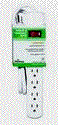 It cost me all of $1.99.
- For a two or more devices that will be on or off at the
same time, use a simple power bar with a switch. The one
pictured at left was four bucks at Home Depot. Oh, so
easy.
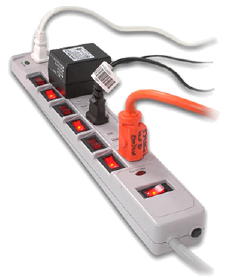 For
several devices that you want to switch separately, get a
power strip with individual switches. While these
are ubiquitous in other countries like Japan, they're hard to
find in the U.S. But never fear, I
found one for you, similar to the one pictured at
right, for $20. If you prefer something more industrial
or rack-mountable, there's the $27 Mr.
DJ rack-mount AC switch bank..
For
several devices that you want to switch separately, get a
power strip with individual switches. While these
are ubiquitous in other countries like Japan, they're hard to
find in the U.S. But never fear, I
found one for you, similar to the one pictured at
right, for $20. If you prefer something more industrial
or rack-mountable, there's the $27 Mr.
DJ rack-mount AC switch bank..
- For computer, TV, or stereo systems, you might like a smart
strip. It's a special power strip
that automatically cuts power to all all your accessory
devices when you turn off the main one. (e.g., Turn off
the computer, and it automatically cuts power to the printer
and scanner. Turn off the stereo, and it automatically
cuts power to the CD player, tape player, etc.) Me, I
prefer a switchbank like I mentioned above, because then I can
keep my scanner and printer off while the computer is on,
turning them on only when I actually need to use them.
- A U.K. product called Bye Bye Standby lets you turn power to an outlet on and (completely) off using a remote control. (The U.S. version has been discontinued.) This is handy if you have only a couple of items to manage, and if the plug isn't in a convenient place for a switch.
More energy to run the clock than the device?
[The following was written back in the 90s when standby power was higher than it is today, but I'm keeping it for historical purposes.]
When we talk about the "energy to run the clock" in a microwave or VCR we're not really being fair, because the standby power does more than just run the clock. It keeps a microwave ready to respond to any button you press, and keeps a VCR ready to respond to the ON button on the remote control (or your instructions to automatically come on at a certain time to record a program). But we're being unfair today, so we'll talk about the power to run the clock, as though that were the only thing going on when the device is off.
Okay, so my old VCR used 5 watts when it's "off", 12 watts when it's "on", and 18 watts when it's actually playing a tape. Let's say I played tapes for an hour a day, and otherwise it was off.
- ON: 1 hour x 18 watts = 18 watt-hours
- OFF: 23 hours x 5 watts = 115 watt-hours
Yes, the clock uses more energy than the device itself. Way more.
Is the same true of the microwave? It depends on how much you use it, and how powerful your microwave is.
- ON: 10 minutes x 1000 watts = 167 watt-hours
- OFF: 23 hours, 50 minutes x 7 watts = 167 watt-hours
So in this case the clock uses more energy than the oven if you use the oven for less than 7 minutes a day. (This is an example because your own microwave likely uses a different amount of energy when it's on and when it's in standby. The numbers above aren't true for all microwaves.)
When energy-efficient appliances aren't
My old Apple Personal Laserwriter 300 was touted as being a modern energy-efficient appliance. It didn't even have an power switch! Apple designed it to automatically go into low-power mode when it wasn't being used, consuming only five watts of power.
If you were the kind of person who never turned off your printer, then this would definitely save a lot of energy -- most of the time you'd be using only five watts instead of several hundred. But if you're the kind of person who shuts things off when you're done with them, then all of a sudden this energy miser is really an energy waster. It sucks five watts of power 24/7, whether you're using it or not.
I solved this problem by putting it on a switchable power strip.