


|
Computers |
|
|
Desktop Computer |
|
|
With screen saver running |
(no difference) |
|
On Sleep / standby |
|
|
Laptop Computer |
|
|
Monitors |
|
|
17-19" LCD |
|
|
20-24" LCD |
|
| 17-19" CRT (old kind) | 56-100
watts |
|
Apple MS 17" CRT, |
|
|
Apple MS 17" CRT, |
|
|
Screen saver (any image on screen) |
(no difference) |
|
Sleeping monitor (dark screen) |
|
|
Monitor turned off at switch |
|
|
Apple iMac |
|
| Most models |
~100w |
| iMac G5 w/bulti-in 20"
screen... |
(see
below) |
|
Doing nothing |
|
|
Monitor dimmed |
|
|
Monitor sleep |
|
|
Copying files |
|
|
Watching a DVD |
|
|
Opening a bunch of pictures |
|
|
Computer sleep |
|
| MacBook
Pro 2.5GHz Intel Core 2 Duo |
|
| Various apps open |
30 watts |
| Playing H.264 video |
35 watts |
| Importing a CD |
38 watts |
| Playing video while
importing CD |
43 watts |
| Converting video |
64 watts |
| EeePC
1000H netbook |
|
| Calculating chess, screen
off |
12 watts |
| Calculating chess, screen
on |
17 watts |
| LCD
wattage from manufacturers' specs and CNET,
2012. As always, figures are examples.
See how to misquote this website. |
|
How much electricity do computers use?
Last update: March 2012
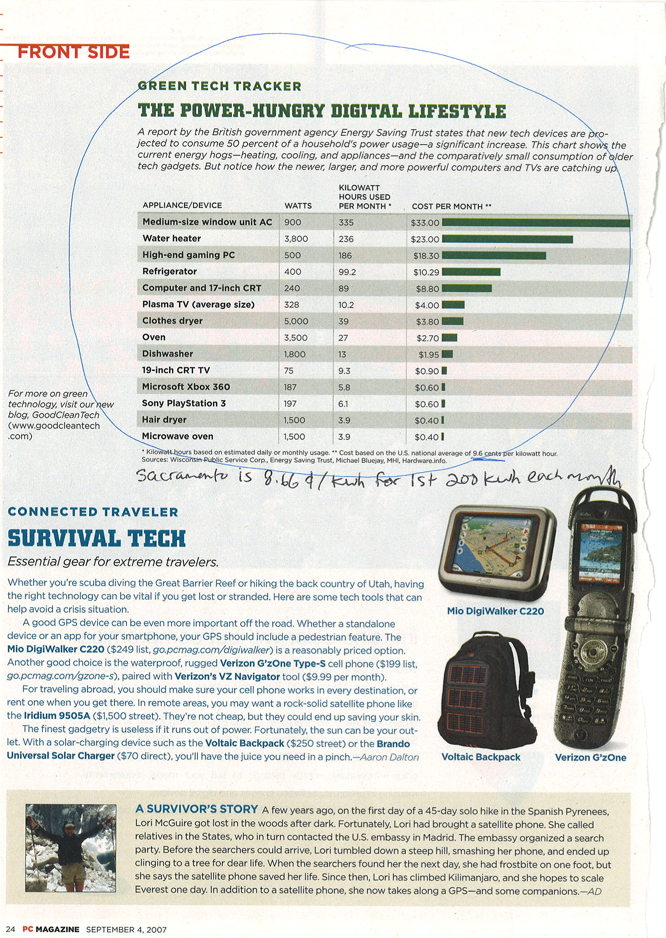
A typical desktop computer uses about 65 to 250 watts. To find the figure for your particular computer you can contact the manufacturer (not me), or see my section on measuring electrical use.
Add another 20-40 watts for an LCD monitor, or about 80 watts if you have an old-school 17" CRT. And don't forget related devices. My cable modem uses 7 watts, my D-Link DI-604 router uses 4.5 watts, and my Motorola phone box for use with Vonage uses 2 watts while idle (3 when I'm on the phone).
Most laptop computers use about 15-60 watts, far less than desktops.
With most devices you can look at the label to see how much energy they use, but that doesn't work so well with computers because the label gives the theoretical maximum, not the typical amount used. A computer whose label or power supply says 300 watts might only use about 70 watts when it's actually running, and only 100 even in peak times with serious number-crunching and all the drives spinning.
As long as your computer goes into sleep/standby when you're
not using it, your computer doesn't use squat for electricity,
compared to the rest of your household. You'll save
a lot more energy by addressing your heating,
cooling, and lighting
use rather than obsessing over your computer. For most
people, their computers' energy use is not a significant portion
of their total use, even if they use their computers a
lot. Of course, you should absolutely make sure your
computer is set to sleep automatically when you're not using it,
because it's silly to waste energy, but your computer likely
isn't even close to being the biggest energy-waster in your
home. (See more about
sleep/standby.) If you
take one thing from this page, it's that you should set your
computer to auto-sleep after 15 minutes or so of inactivity.
How much it costs to run your computer
To calculate your costs use this formula:
|
|
x Cost per kilowatt-hour = Total Cost |
|
|
|
|
|
For example, let's say you have a big high-end computer
with a gaming-level graphics card and an old CRT monitor, and
you leave them on 24/7. That's about 200 watts x 24 hours
x 365 days/yr = 1,752,000 watt-hours, or 1752 kilowatt-hours. If
you're paying $0.36 per kWh, you're paying $631
a year to run your computer.
(In California, PG&E's highest tier is $0.33/kWh, and the
average in Hawaii is $0.36/kWh. source)
Let's try a different example: You have a computer that's less of an energy hog, like in iMac G5 20", which uses about 105 watts, and you're smart enough to turn it off or sleep it when you're not using it. You use it for two hours a day, five days a week. That's 105 watts x 10 hours/week x 52 weeks/year = 54,600 watt-hours, or 54.6 kWh. If you're paying 10¢ per kilowatt-hour, then you're paying about $5.50 a year to run your computer.
That's quite a range, $5.50 to $631 a year. It really
depends on what kind of computer it is, how much you use it, and
your local rate for electricity -- and especially
whether you turn off the computer when you're not using it (or
at least sleep it).
Both the examples above are extremes. I used to have only one
example somewhere in the middle but then I'd see people on blogs
and forums misquoting it by
writing, "Mr. Electricity says a computer costs about about
$150/yr. to run." No, that is not what I said. I
said that was just an example.
Your situation is almost certainly different, and you need to
consider all the variables listed in the first sentence of this
paragraph.
Factors that affect energy use
More Energy
Less Energy
Ready to be used
Sleep / Standby
Desktop
Laptop
Faster processor
Slower processor
PC
Mac
Heavy use
(all drives spinning, processor-intensive task)Light use
(e.g., email, word processing)On the Internet
Offline
Sleep & Screensavers
Modern computers automatically go to "sleep" when you
haven't used them for a while, drawing only 0-6 watts. (Putting
the
computer to sleep also sleeps the monitor, on most
models.) In the past, turning on the sleep setting was the
most important way to save on computer energy use, but now that
the sleep option is turned on by default out of the box, that's
pretty much done for you. Just make sure you don't
override it by turning it off. Of course, you can
go the other direction, tweaking your sleep and power usage
settings, especially by having your computer sleep sooner after
a period of non-use. Here's where to set your options:
- In Windows 7 or Vista go to Start
> Control Panel > Power Options (here's
a
how-to-article,
an article about power-saving
changes in Windows 7, and default
settings in Vista)
- On a Mac go to System Preferences > Energy Saver
There are various flavors of sleep, including Sleep, Standby, and Hibernate. It's not terribly important to understand the difference between them. In a nutshell, hibernate saves your workspace (all the open windows) and then turns your computer off, so it saves more energy than standby, but a hibernating computer takes longer to wake up. For the curious I have a separate article about the differences between Sleep, Standby, and Hibernate.
A screensaver that shows any image on the screen doesn't
save any energy at all, on either the monitor or the
computer. You save energy only if the monitor goes dark by
going to sleep.
Granola power saver
A Windows/Linux app called Granola constantly optimizes your computer's processor speed to save electricity. They claim savings of 10-35% without sacrificing performance, and laptop users will get more battery life off a single charge. Granola is free for individual users, and $8 per machine for business users. It's not available for Macs. Note that Granola isn't a substitute for sleeping your computer, it's a complement to sleep. If you had to choose one or the other, you'd definitely save more by having your computer auto-sleep rather than using Granola. But you don't have to choose one or the other, you can do both.
My recommendations
- Set the Power settings on your computer to automatically go into Sleep/Standby mode after 15 minutes or so of inactivity.
- Use a laptop computer. They use lots less energy than desktops.
- If you use a desktop, use an LCD monitor. They use lots less energy than CRT's.
- Turn your computer off when you're done for the day.
- Use a Mac, or use the Granola power saver for Windows/Linux. Macs have generally used less electricity than most PC's. (I haven't had a chance to test current models, but I don't expect that a lot has changed.)
- Use a power strip so you can easily turn off all your
computer accessories at once. BITS makes a special
power
strip that goes one step further, automatically cutting
power to peripherals when you turn your computer off.
Specific Models
Here are some figures for some specific models. Don't write to me to ask me how much your particular computer uses, because I didn't make your computer and unlike you, I don't have access to it. Contact the manufacturer or buy a watt-hour meter.
|
|
Apple
iMac G5
w/built
in 20" LCD screen Doing nothing Monitor dimmed Monitor sleep Copying files Watching a DVD Opening a bunch of pictures Computer sleep |
|||||||||||||||||||||||||||||||||||||||||||||||||||||||||
Yes, it doesn't make sense that the Dell GX620 is listed as using more power when it's off than when it's sleeping, but I'm just reprinting the numbers from Dell's specs.
Dell Pentium 4's from Dell's website. iMac G5 from my own measurements (except the max, which is Apple's spec).
The University of Pennsylvania has a somewhat more recent list of Mac / PC wattage.
You won't wear your computer out any faster by cycling it once a day, or even a few times a day. Modern computers just aren't that fragile. I did hardware troubleshooting at Apple, by the way. If you don't believe me, maybe you'll believe Jonathan Koomey, a project scientist at the Lawrence Berkeley National Laboratory, who says, "PCs are not hurt by turning them on and off a few times a day." (Wall St. Journal) The useful life of a computer these days is only a few years anyway. The computer will become obsolete long before you wear it out, no matter how often you cycle it. Bottom line: Turn your computer off when you're done with it (or simply Sleep it), and don't worry about it. (more on this topic...)
It also doesn't take more energy to start a computer than to keep it running. The only extra energy it takes to start a computer is the two minutes or so it takes to start up, which is barely different than any other two minutes' of use. You'll always save energy by turning your computer off when you're not using it. Of course you don't have to turn it off since you can easily use the sleep or standby mode instead.
The myth of "turning it off uses more energy than keeping it on all the time" exists for just about every device that exists, and it's wrong in every single case, in practical terms. (Meaning, you will never, ever, ever see any savings on your electrical bill by keeping something on all the time vs. turning it off. Period.) You will always save electricity by turning your device off when you're not using it (or sleeping it, if it's a computer).
Whether to use a laptop to save energy
Some people think it's a bad idea to replace desktops with laptops even though they use less energy, because they're more likely to require repair, those repairs are more expensive than desktop repairs, many users thus choose to replace their broken laptop rather than getting it fixed, and laptops require disposal of chemically-laden batteries when they wear out. While these things are true, I think the average person (and the environment) will still come out ahead over all by using a laptop over a desktop, because only a fraction of laptops will actually break and get replaced. If every laptop failed like this during its life (or even if most of them did), we could easily say that it would be better to stick with desktops. But since only a fraction of laptops fail, I still think there's a net savings by using laptops.
Energy-Efficient PC's
In June 2007 the EPA started giving an "Energy Star" rating to energy-efficient computers. While this is important, sleeping your computer when you're not using it is more important. An inefficient computer that sleeps when you're not using it uses far less energy than an Energy Star computer you keep running 24/7. This is so important I'm going to repeat it: Making sure you sleep your computer when you're not using it is way more important than what kind of computer you use.
Computer power supplies are only 55-80% efficient. That means with a cheap power supply, nearly half the energy consumed is wasted. At least 80% efficient power supplies are required to get the EPA Energy Star label, but even then up to 20% of the energy consumed is wasted. (Tom's Hardware)
There are a handful of ultra-low-energy PC's available. They all come with some flavor of Linux instead of Windows, and typically come with Firefox for web browsing and Open Office for productivity. The low-power processors they use also mean that they're a bit slow. (e.g., The Linutop 2's AMD LX processor runs at 500 Mhz.)
- Zonbu. Their $300 Mini desktop uses only 15 watts.
- Linutop. Makes tiny PC's that use only 5 to 8 watts, for around $400.
- Everex gPC. Claims to use only 2 watts on average but I'm skeptical because their website is short on details.
Energy required to make a computer
This paper said it took about 6400 megajoules of electricity to make a desktop computer and a 17" CRT monitor in 2000, which would be about 1778 kwh -- or as much electricity as the typical household uses in two months. Yet another reason to buy used. I've purchased my computers on eBay since 1998.
The Internet and Electricity
The Internet and Electricity
The Internet doesn't use as much electricity as you might think.
Computers account for only a fraction of worldwide electrical use, even with the burgeoning Internet. Air conditioning, lighting, and refrigeration account for a lot more. In fact, as inefficient CRT monitors are being phased out in favor of newer LCD screens, and as more people replace their desktop with laptops, computer energy use isn't likely to rise very much in the coming years.
The site UClue gives an outrageous estimate for the Internet's use of electricity, clocking it at 9.4% of all electricity used in the U.S. The first problem is that they count individual users' computers, even though those computers don't power the net. And even though those computers do use the net, their owners aren't surfing for 100% of the time the computer is on. Further, even if there were no Internet, office employees would still use computers all day (like they did before the Internet). And for home users, if someone's not on the Internet, they're probably watching TV, which uses even more energy. So personal Internet use isn't "new" energy being used. Finally, I think UClue is overestimating the amount of energy used by end users' computers in the first place. (And their link to their source for that figure is dead.) So taking personal PC's out of the picture and looking only at the energy to run the datacenters (including the costs to cool them), UClue's figure drops to only 1.2%.
We should also consider how much energy the Internet saves
us. For starters, take a look at this website; thousands
of people have used it to learn how to reduce their consumption.
That's nothing to sneeze at. And online shopping means you
can buy stuff from your home without driving somewhere, meaning
more energy savings. Online maps let us find our destinations
easier with less driving, too. Then there's the fact that email
lets us send messages and documents without requiring a
fossil-fuel vehicle to physically deliver the hardcopy. So the
Internet's share of energy use should be certainly be contrasted
with the amount of energy it saves.
Now let's talk about the electricity to power websites. If you had to have a separate computer to host each website, then we'd have a big energy problem, but fortunately that's not how it works. A single computer (server) can host hundreds or even thousands of websites. In fact, that's what made websites affordable to the masses in the late 90's. If you had to rent the whole computer from your host then the cost would be astronomical. But your site is on the same server with lots of other folks' sites, which is why they call it shared hosting. By contrast, dedicated hosting is when you rent an entire server for yourself. But even then, you can put dozens or hundreds of sites on your server, as I've done with mine. And for my server, I chose a host that purchases carbon offsets to offset the pollution caused by generating the electric to run the server, which is why you see the "This site is green" logo on the bottom of the page. Also, in October 2008, they announced they were spending $1 million to upgrade their old servers and cut their energy costs in half.
The very largest sites (Google, Yahoo, eBay) require multiple servers just to run their one site. But those sites are used by millions of people every day. The energy use on a per-person basis isn't that great. Also, the largest companies have been taking bold steps to reduce their energy footprint. For example, in 2007 Google built a massive 1.6-megawatt solar system at its headquarters in California. It generates 30% of Google's peak demand, and around two million kWH a year. It's the largest corporate solar install in the U.S. (There are larger installations at utility companies, but this is the biggest for a company generating its own electric.) Google has a page where you can see how much electricity they generated in the last 24 hours and the last 7 days. You can also see a flyover video of their installation. The system will take 7 years to pay for itself, and then will generate free electricity for another 18. (The lifespan of the panels is about 25 years.) It doesn't end with this huge installation. In late 2007 Google announced its plans to develop a whopping one gigawatt of energy from renewable sources at a cost cheaper than coal, and to do it "within years, not decades". Wow!
Yahoo is also addressing its energy footprint. Besides Yahoo cutting the carbon footprint of its data centers by 40%, they have a very progressive Commute Alternatives Program to encourage employees to not drive to work alone. It includes things like shuttles to transit stations, transit discounts, a carpool matching service, preferred parking for carpoolers, bike racks/lockers/showers, and free lunches, massages, and movie tickets to employees who participate in the program.
In short, there's no need to scapegoat the Internet for electrical use -- especially when things like cooling, heating, lighting, and refrigeration use so much more. And this site will give you lots of ammunition for how to use less.
Questions & Answers
See questions I've received and answered about how much energy computers use. Please note that I'm not accepting any more questions for this website, period.